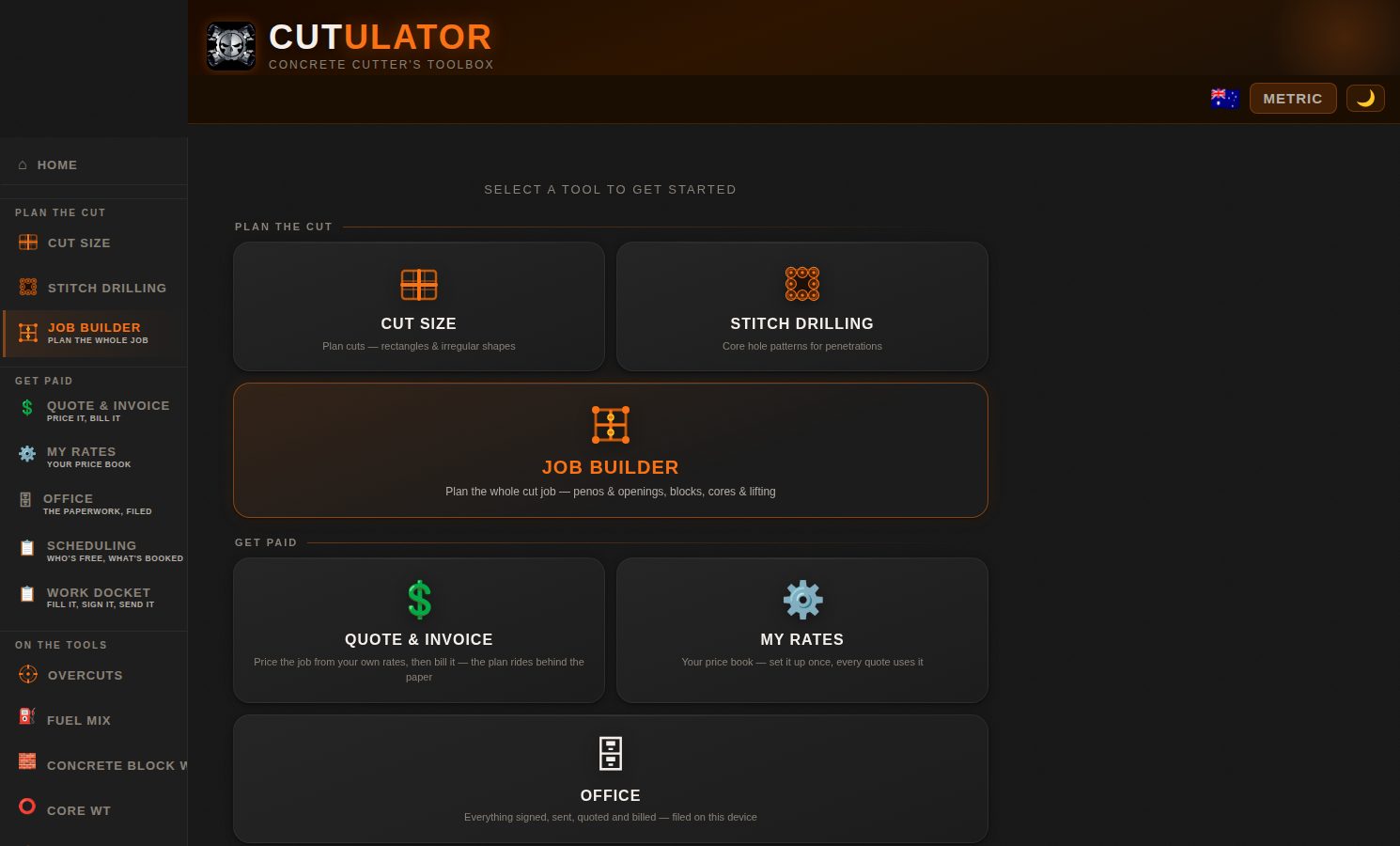
Laid out the same way as the app's home screen β find the tool you're standing in front of, tap it open. The numbered steps here are the same numbered cards you'll see on screen.
or any browser at cutulator.app.
On the office computer it opens in its own window, like a normal program.
The three planning tools, smallest to biggest. Every result has π Copy Β· π€ Share Β· π PDF.
Full penetration removal treats the slab as a peno and cuts the outer perimeter too. For the full job β relief cores, lifting, machines β step up to Job Builder.
You get total cores, perimeter and internal counts, total drilled metres, each core's weight and the net block weights. Standard edge keeps every hole inside the line; Clean Edge lands the scallops on the line itself for a clean finished face.
β Edit plan is yours: drag any cut or core and the engine re-derives blocks, weights, metres and cores around your change. Then π PDF for the crew β or π² QUOTE THIS JOB and every line prices itself from your book.
Set the book up once, then every quote, invoice and docket runs off it.
Buttons along the top: β© Export book / β§ Import book move the whole book between devices (the office sends it to every phone). οΌ Client book copies the current book for a client with special rates β the Quote tab asks which book once there's more than one.
Running several books from the office: the sheet's name (top-left cell) picks the book. Standard updates your standard book, Mirvac rates updates that client book β and a name the app doesn't know creates a new client book from the sheet.
π¦Ί Crew file exports just your words β terms, JSA, Pre-Start β to text to every worker. Their dockets carry your checklists; your prices never leave your phone.
Fill it onsite, the client signs it, one file goes to the office. The six numbered cards on screen, in order:
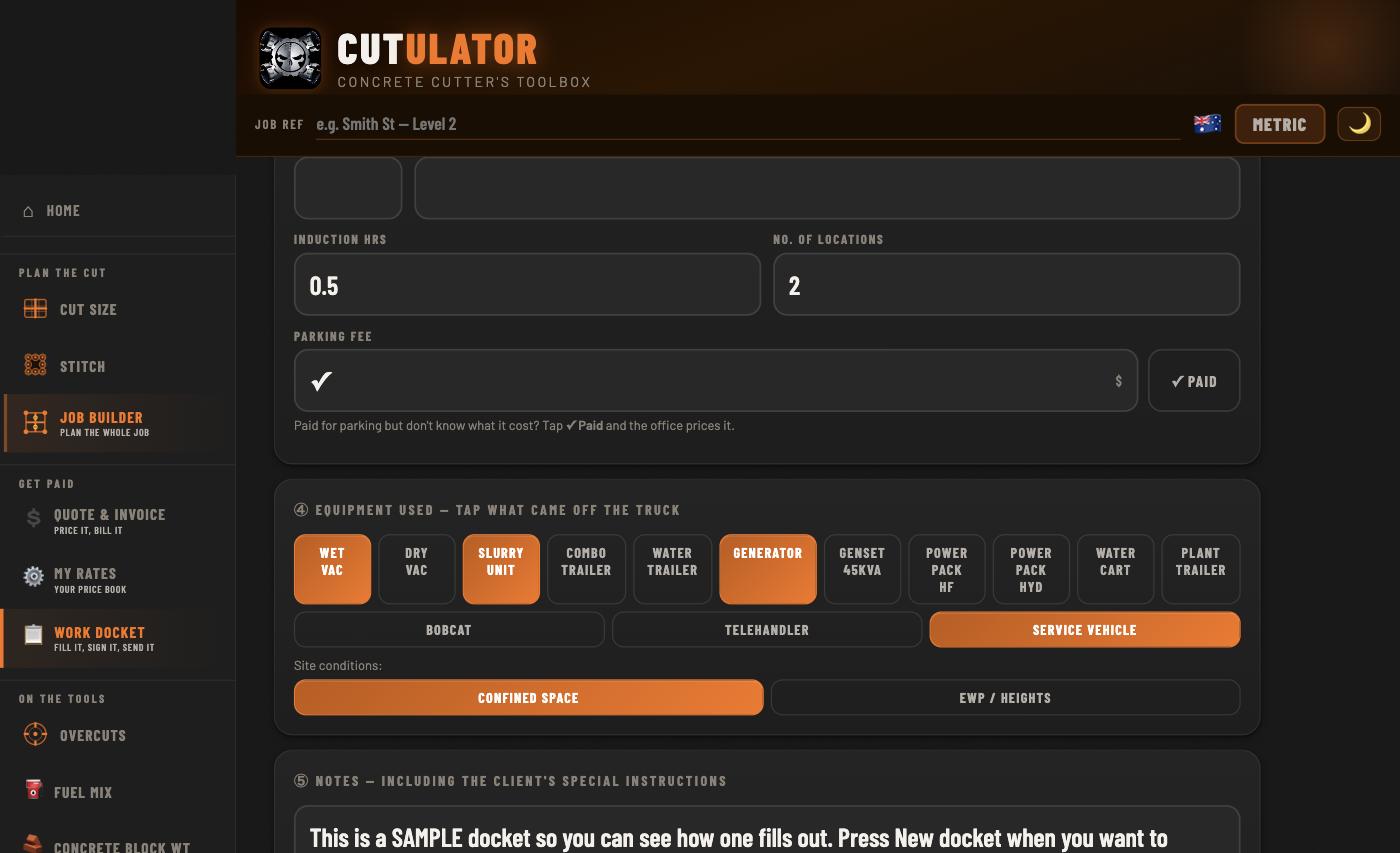
Cards β’ and β£: the extras carry the reason, and equipment is a tap each.
π¦Ί JSA / Pre-Start is its own page behind the button under the docket number β optional, there when the site wants it. Boxes cycle β β β β N/A β blank (N/A is a real answer). The checklists are whatever the boss typed in My Rates, with their own two signatures β the JSA signer and the docket signer can be different people.
Together on site: the client signs the pad on your phone (β€’ Sign big for a full-screen pad), you sign as witness. Done.
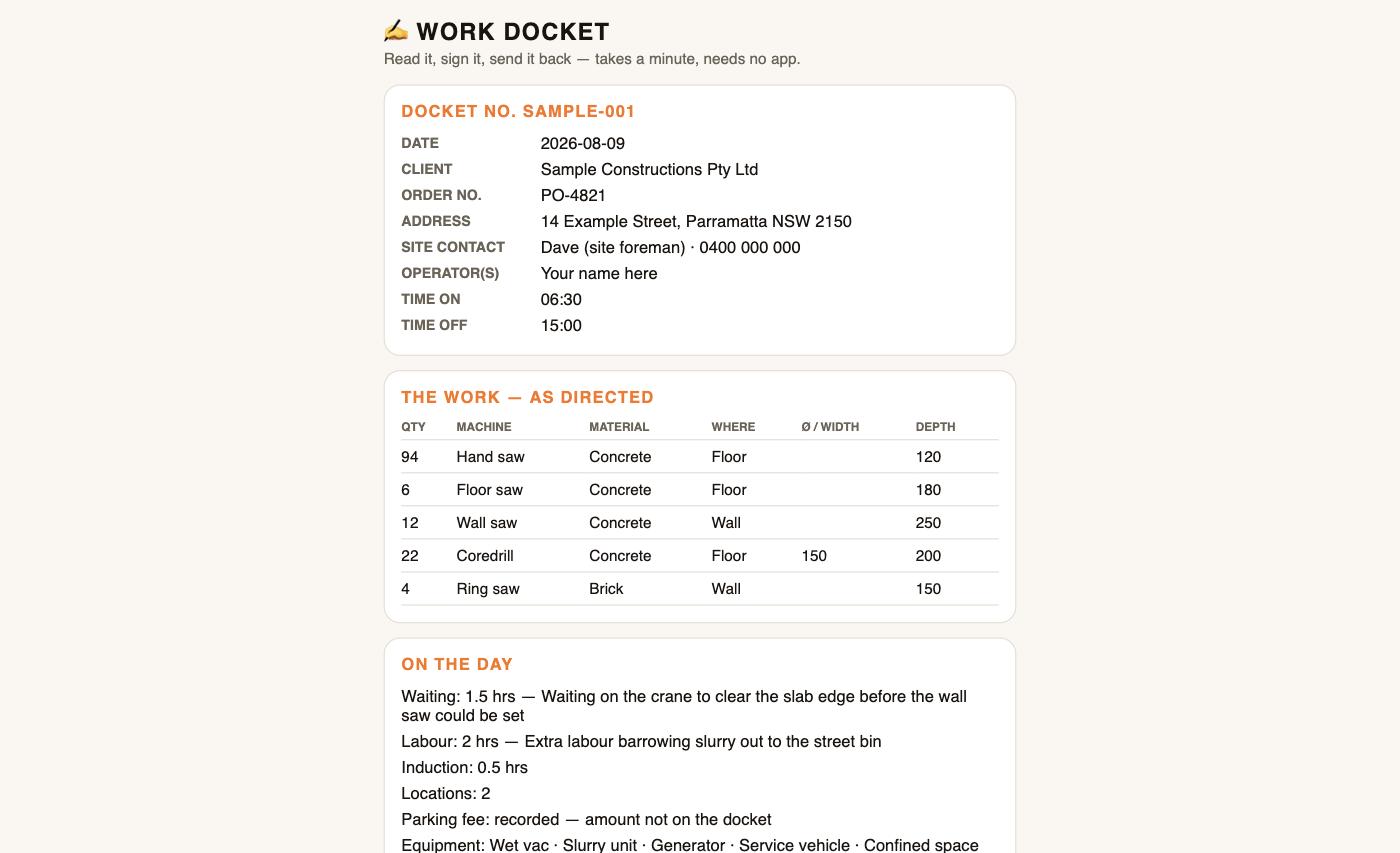
Not together: tap π Send to client to sign β the link copies itself, text it to them. What they see:
Exactly what your client opens. No app, nothing to install, and not a price anywhere on it.
Then βͺ Send to office β ONE file that reads as the signed PDF and opens in Cutulator at the office. οΌ New docket files this one under π Past dockets and starts the next.
Usually the boss's phone, or cutulator.app installed on the office computer.
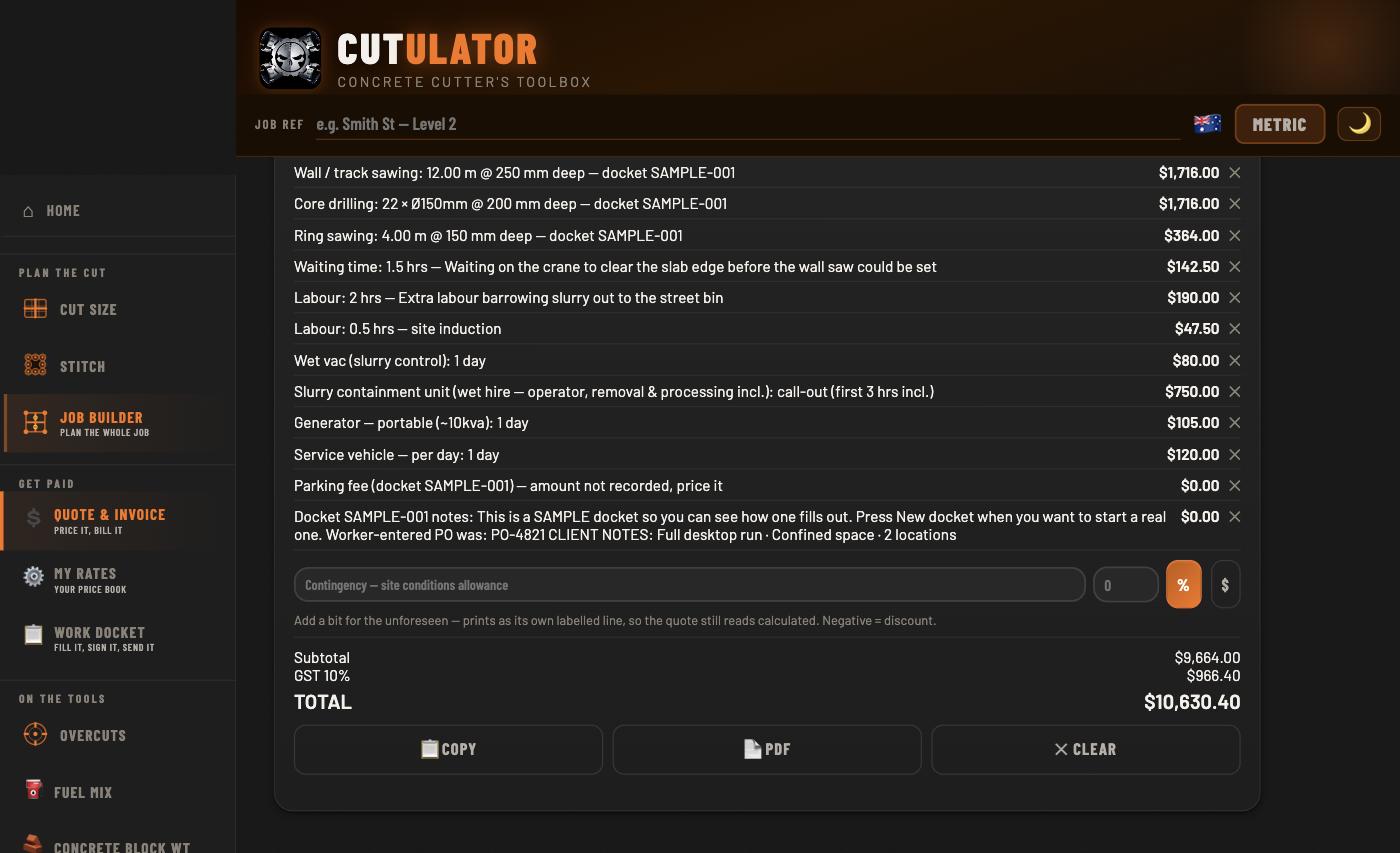
The docket above, priced off the book and turned into a tax invoice. Every line reads back to the work that was done.
π₯ Received dockets keeps every import: Open shows the signed record itself β ink, photo, checklists; Load re-prices it; β clears it. Status flips to invoiced when the invoice prints.
Beside Past dockets. Every quote and invoice files itself here the moment its PDF is made β number, client, date, status. The orange ones are your unpaid invoices; tap β Paid when the money lands. Open reprints any paper exactly as it went out β your rates moving later never rewrites an old invoice. Holds a year and more.
On the Past papers card: β¬ Xero CSV β this month (or last month, or the financial year). The file is built to Xero's own import format β Sales β Invoices β Import, straight in. MYOB AccountRight, QuickBooks Online and Reckon import the same file through their column-mapping screens. Amounts ex-GST, tax named on every line, exactly as the importers want.
Bookkeeper uses a particular sales account code or tax rate name? Set the two Accounting rows in the rates spreadsheet β otherwise Australian defaults apply. β¬ Ledger CSV exports your own full record β every paper, status, paid date.
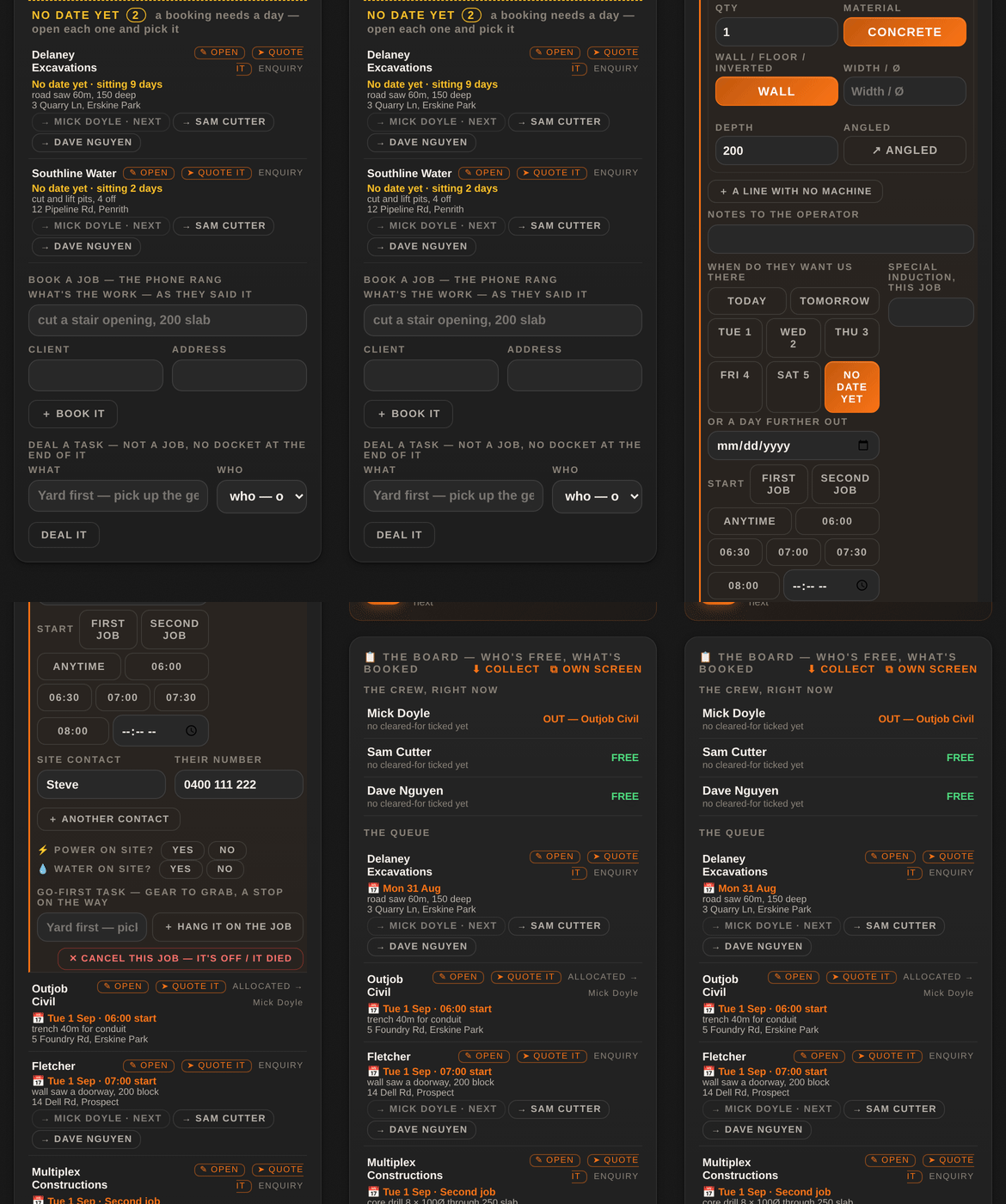
The office's engine room: who's free, what's booked, and every job wearing the day the client wants you there. On a phone it stacks in one column; on the office computer the crew stands beside the queue, and β§ OWN SCREEN puts the board alone on its own monitor.
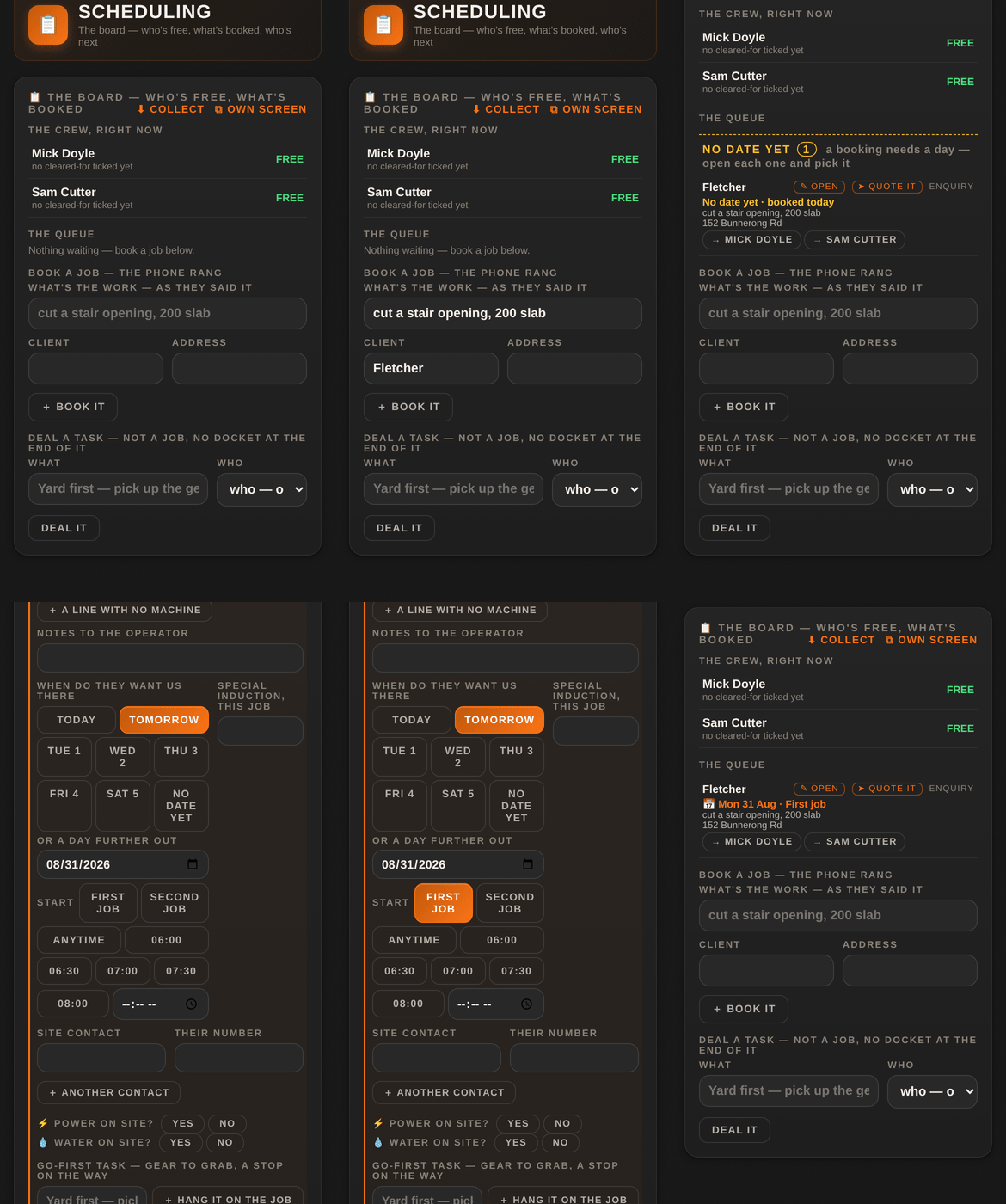
The phone call, straight onto the board β and the day picked in two taps.
Every job in the queue says its day on its own line β π Tue 1 Sep Β· Second job β and the queue sorts by day, jobs with a set time first.
A job with no day waits where you can see it β and two taps place it.
Jobs with no date sink to the bottom of the queue under one heading, NO DATE YET, oldest first, each one wearing its age β sitting 9 days. A booking needs a day; until it has one it sits where you meet it every time you book anything, so the job the client rings about is never the one nobody looked at.
A finished visit can be dealt again β same job, next day, same or different operators. Carry-over is the trade's normal day, not an error.
Deal a task β not a job, no docket at the end of it: go to the yard, pick up the genny, drop the wire saw off for service. Type what, pick who from the roster (or leave it undealt) β Deal it. A task ends in done, not paper.
A go-first task typed on a job's card hangs on that job and rides first on the man's day β the gear gets picked up before he drives past the yard.
On the man's phone, the My Day tab: what the office dealt you β where, who, what to know. His day is a sequence, not a timetable: what he's done, what he's on, and what's next only once the office has dealt it β because nobody really knows how long a job takes, and the office usually hands out the next one when he calls in free.
β I'M DONE tells the office he's free β no phone call needed. And when he opens the docket for the job he's on, it starts already filled in from the booking.
β€ QUOTE IT on a job's card opens Quote & Invoice with the plan's lines carried across, and the quote number rides back on the job. Going the other way, π Book it on a quote puts it on the board as a QUOTED job. Both roads are real β some jobs start with a phone call, some start with a quote β and the paper trail holds together by the numbers.
Never a dollar on the board itself. Money lives in Quote & Invoice; the board holds the work.
For everyone on the tools β crew and quoters. When your card is not finished, a π Set-up counter sits in the top bar where the quote total goes. Tap it: it opens the thing it wants next and tells you which step it is. Show me how on that message opens the matching part of this page. The counter disappears for good once the list is done, and a live quote always outranks it β your money is never covered by a nudge.
Setup tab β Your name. This is the one name the app has for you: it prints on your card, on the dockets you sign and on the ticket bundle you hand a site office. Type it the way it appears on your tickets β a docket signed "Jaz" against a white card that says "Jarrod Rapson" gets questioned at the gate.
Your card reads this name; it never keeps a second copy. Change it in Setup and everything follows.
Tickets tab β tap the face on your card β take one or pick one. Head and shoulders, no hard hat over your eyes β it is what a site supervisor compares against you at the gate. The photo stays on your phone; it only travels when you hand over a crew file or a ticket bundle yourself.
On your card β "Concrete cutter", "Leading hand", "Operator". It prints under your name on the card and on the papers you send.
On a crew phone you will not see this step: your title and your can-do boxes are the office's word, not yours, so the app does not stand there asking you for something you are not allowed to give. It arrives with your seat.
Tickets tab β Add a ticket β pick the type, type the number, photograph the front and the back. White card, HR licence, EWP, confined space, first aid β whatever you carry.
Add the expiry date if it has one. The app watches expiries for you and warns you before a ticket goes out, so you find out in your own driveway instead of at a gate at six in the morning. One ticket finishes this step, but a bundle is only worth what is in it β put them all in.
On your card, tick the gear you are cleared to run β ring saw, wall saw, core drill, floor saw, chainsaw, EWP. It rides down in the crew file the office hands you, and it shows on your card read-only, so your phone and the office's training records can never disagree.
Crew phones do not set this: the office ticks it, because being cleared to run a machine is their call, not yours.
Install tab β follow the two taps for your phone. This is the one step blokes leave and then regret, so the app keeps it on the list.
iPhone (Safari): the share button β at the bottom of the screen on older iOS, under β― at the top on newer β then Add to Home Screen β Add. Do this first: a home-screen app starts its own fresh copy, so anything you set up in the browser stays behind. Keep whatever your boss sent you and paste it in again.
Android (Chrome): the three dots at the top right β Add to Home screen β Install.
Why it matters on a job: it opens like an app instead of you hunting through twenty tabs, it fills the whole screen so the docket buttons are where your thumb expects them, and it keeps working with no signal in a basement or a lift shaft.
And it is the safest place for your work. Everything you type β your rates, your clients, your dockets β lives on this phone, not on anyone's server. A browser tab is easy to close by accident, easy to lose in a tab-cleanup, and a browser that has not seen a site for a long stretch is entitled to clear what that site saved. The app asks your browser to mark this data as persistent, which is what actually protects it from being cleared, and a browser is far more willing to grant that to something you have installed than to a tab you visited once. Check it any time: Setup tab, the status card, the Storage line.
How much room you get depends on the browser, and the permission is what unlocks the good end of it. On Firefox, a site that has not been granted persistence is held to about a tenth of the disk; once it is granted, that becomes about half. On Chrome, Edge and Safari the allowance is already generous β roughly 60% of the disk β and the permission does not raise it; what it changes there is that your work stops being treated as disposable. Either way, installing is what gets the permission granted.
One thing worth knowing on an iPhone: a web page opened inside another app β a link from a message or a job-board app β is only allowed about a quarter of what Safari itself gets. Another reason to work from the icon on your home screen rather than whatever tab you last tapped a link in.
When cutulator.app is installed on a computer with the suite unlocked, a π Office set-up counter sits in the top bar. Tap it and it takes you to the next step and tells you what it is. Steps marked optional have a Not now button β tick them off without doing them and come back whenever you like. Show me how opens the matching part of this page.
Office tab β Your company card β type the trading name exactly as it should print on quotes and invoices. It appears on every paper, on the crew's tickets and in the signature screen the client sees.
Same card. An invoice without an ABN is not a tax invoice, so it prints on every one. Eleven digits, spaces are fine. Outside Australia the field reads ABN / business no. and takes whatever your country calls it β an EIN in the States, a company number in the UK.
Same card β Logo β pick a PNG or JPG. It prints top-left on every quote, invoice and docket. Without one the company name prints there in plain type, which is perfectly fine. The picture is part of your company badge, so it travels with the paper you send β it rides the crew file and the docket your client signs. It is never sold, shared, or used for anything else.
Office tab β Getting paid card β account name, BSB and account number. These print in the PAYMENT block on every invoice and every quote — a quote carries them because a prepaid job has to be paid before anyone turns up. They live on this computer only β never on the app's servers, never in a backup that leaves your hands unless you send it.
Same card β Pay online link. If you have a Stripe, Square or PayPal payment page, paste its address here and every invoice carries a "Pay online" button beside the bank details. Clients who pay by card pay faster.
Getting a Stripe payment link: sign in at stripe.com β Payment Links β New β leave the amount blank so the client types what the invoice says β Create β copy the link. That link is all the app needs. The app never holds your Stripe login or any key β only the public address a client can already see.
No card payments yet? Tap Not now. Bank details alone are a complete invoice.
Your company card β Terms β the number of days a client has to pay. The due date prints from this on every invoice. Seven, fourteen and thirty are the usual ones.
Setup tab β Accounts inbox β the email address your papers should go to. When a worker finishes a docket, or the office makes an invoice, the share sheet offers that address first so nothing lands in a personal inbox. Leave it blank and the share sheet just asks each time.
Office tab β Your rates card β Start from the sample, then change every rate to yours. The book never leaves this computer.
Be straight with yourself about the sample rates. They are real numbers and the app will quote off them. They are there so you can drive the whole thing before you spend a day typing prices β not so you can send one to a client.
Before you press Start from the sample you are safe: the paper prints as Sample Concrete Cutting with a BSB of 000-000, so nobody could act on it if they tried. The moment the book is yours, that safety net is gone β your own company and your own bank go on the paper whether the prices under them are yours or the sampleβs. Your screen keeps warning you (β211 of 217 rates are still the sampleβsβ); the clientβs copy does not carry that warning, on purpose, because it reads badly on a customerβs quote. So the check is yours: read your own screen before you send.
Office tab β Numbering card. Quotes and invoices run in two separate series (Q1, Q2 β¦ and INV1, INV2 β¦) under a prefix of your choosing β usually your initials. Set a starting number if you are carrying on from an old book so nothing overlaps. Dockets have their own prefix and run. Leave it alone and the app numbers from 1 with no prefix, which is legal and fine.
Office tab β Hand out seats card. Add him to the Crew roster first β type his name into the roster card and press οΌ Add. Until he is on the roster the app refuses to mint his link, and it says so. Then pick the role β crew sees dockets and tickets only, no prices; quoter can price and quote; office sees everything β then Deal a seat and send the link to the worker. Their phone joins in one tap. Solo operator with no crew? Not now.
Setup tab β Backup card β Pick a folder. Choose a folder on this computer (or a synced one like OneDrive or Dropbox) and from then on every quote, invoice, docket and report is also written there as a PDF β Quotes/2026, Invoices/2026, Dockets, Reports β the moment it is made. The browser will ask you to allow it; say yes. It is a mirror, not the database: the app keeps working if the folder goes away. Phones and Safari cannot do this, which is why the step only shows where it is possible.
Setup tab β Backup card β Back up now. One file holds your rates, your clients, every paper and every seat. Put it somewhere that is not this computer. The counter does not clear until the first one is taken, and the card tells you how long since the last.
The quick ones β open, type, read.
1How much petrol. 2Pick the ratio (or type one and save it). 3Read the oil in mL, with the breakdown. Tip: oil first, then petrol on top, shake well.
Block: rectangle or drawn shape Γ depth. Core: Γ Γ depth, common sizes one tap away. Weights flip to tonnes when they earn it. Estimates β always work to your gear's SWL/WLL.
1Floor or wall. 2Hole Γ and thickness. 3Your rig's geometry (defaults suit the Hilti DD350 on the HD-30 stand β all editable, save your own rig). 4The angle β slider, typed, or worked back from a known offset. You get the total drilled length (= the barrel to order, +10% safety), the anchor distance at that angle, the entry-opening ellipse to mark, and the core's weight. Mark both entry and exit centres before drilling.
Thickness, machine, flange, blade β the overcut past each corner at depth, whether that blade reaches full depth, and the two ways out: π© Stitch to avoid overcut plans the corner cores; Sink blade deeper shows how an oversized blade sunk past "just touching", stopped short of the corner, still reaches it with less surface overcut.
Pick brand, pick model β anchor and foot distances, factory figures and field practice side by side. Always verify against your own machine and manual before drilling.
Camera or gallery, then tap to place dots β lines connect themselves; tap an existing dot to branch. Add core circles, arrows, text notes. Undo, clear, fullscreen. Share it or drop it straight into the job report.
Bubble level flat on the surface, or angle mode sitting upright on its bottom edge (0Β° = plumb). Hold freezes the reading. iPhones ask permission for the sensors once.
From any tool: π PDF. Tick which sections join (orange = has data), add your logo, company name and job reference, preview, share. The Quote PDF is its own layout with the plan behind it.
Everything lives on your device β so the backup is yours too. Setup β β© Back up everything makes one file: rates, words, papers, dockets, bank details. Email it to yourself now and then. New phone: install Cutulator, β§ Restore from backup, enter your unlock code. A lost phone costs you the phone and nothing else.
The docket number counts up on its own; the field is editable, so set it once to match your books. A boss can set a prefix and hand each phone its own number range β when a phone runs low it says so.
The whole app runs in any modern browser, on any machine you own. One job β filing straight into a folder β needs a desktop browser that can be handed a folder, and that is the only difference worth knowing about.
iPhone: open it in Safari, then Share β Add to Home Screen. Android: open it in Chrome, then Install app from the menu. Either way it lands as a proper icon and runs full screen with no address bar. Dockets, tickets, the calculators, signing a client, sending the paper β all of it works on the phone, and it works with no signal.
Use Chrome or Edge. They are the browsers that can be handed a folder, so they are the ones that can file every quote, invoice and docket PDF straight onto your own drive as it is made β Setup β Back up this device β π File to a folder on this computer. Pick the folder once and it keeps doing it. That row only appears where the browser can actually do it, so it will not offer you something and then fail.
The office runs perfectly well β quoting, invoicing, dockets, the ledger, backups. The only thing you will not see is the file to a folder row, because those browsers cannot be handed a folder to write into. You still get every paper as a normal download, and β© Back up everything still makes the one file that holds the lot. If you want the automatic filing, run the office side in Chrome or Edge.
A second office computer is a full till β its own book, its own numbering β and it is included, not a second seat. Point both at the same folder and either one can pull in the other's papers with β© Pull in the other computer's papers. It is a union, never an overwrite: nothing of yours is ever changed by pulling.
Your price book, your clients, your dockets, your quotes and your invoices are stored on the phone or computer you typed them into. Not on our server β we haven't got one with your work on it. There is no account to make and no password to lose.
That means nobody can leak what nobody has. It also means the copy on that device is the copy, so the backup file below matters more here than it would in an app that keeps everything in the cloud.
Never leaves: your rates and margins, your client list, your bank details, your quotes and invoices, your photos.
The one thing that does: a docket you choose to send a client to sign. It travels encrypted β the key stays on your phone and theirs, so we cannot read it either β and it carries no prices at all. Your client sees the work, never your rates.
If you never send a docket for signing, nothing about your jobs ever leaves the device.
Quoting and invoicing run in any browser on the office machine β nothing to install, and the work is saved on that computer. The blokes' phones keep their own dockets; the office keeps the office's.
Each device holds its own work. Moving a rate book from the office to the phones is what Export price book in Setup is for.
Browsers are allowed to clear a website's storage when a device runs low on room. Cutulator asks yours not to, and Setup β π This app tells you plainly whether it agreed.
If it says your browser could clear it, the fix is to install Cutulator properly β Share β Add to Home Screen on a phone, or the install button in your browser's address bar on a computer. An installed app is granted the protection freely. The card has a button that walks you there.
"Clear browsing data" will still wipe it, on any device. That is what the backup is for.
Setup β β© Back up everything gives you one file with the lot: rates, clients, dockets, papers, bank details. Put it wherever you keep things that matter β the office server, Dropbox, or email it to yourself.
The card remembers when you last did it and says so. If you have work in the app and no backup, it will tell you β once, with a button, not a nag.
The ATO wants business records kept five years, and digital copies count as long as they are clear and you can actually find them again. A backup file a month, kept somewhere real, covers you.
Thousands of dockets, photos and all. The app shows you what it is holding in Setup β π This app β how many dockets, how many quotes and invoices β so you are never guessing.
No. Not another company, not a client, not your own crew unless you hand it to them β and not us. This page says exactly why, and exactly what does leave a phone, so you can check the answer rather than take our word for it.
Your rates are saved on the device you typed them into. There is no account, no login, no company database, and no copy of your book on any server of ours β there is nowhere for it to sit. If you and another cutter across town both use Cutulator, your two books never touch, because neither book ever leaves the phone it lives on.
The only way your rates move is if you move them: exporting your book to hand to a quoter, or taking a backup. Both are files, both go where you send them.
There are only five roads out, and you press the button on every one of them:
Your client list, your invoices and your price book are on none of those roads except the ones you carry yourself.
When something does travel β a docket to a client, a card to the office β the phone scrambles it before it goes, using a key that never travels with it. For a signing link the key is the part of the address after the #, and browsers never send that part to any server. For crew updates the key is made on the office device and handed out inside the crew file, phone to phone.
What the server in the middle can see is a block of scrambled text, how big it is, and when it arrived. Not what it says. That includes us β we could not read your docket if you asked us to, and support cannot recover one for you, which is the honest trade for nobody else being able to read it either.
Nothing is shared between companies β not a database, not a customer list, not a numbering run. Each office makes its own key the first time it hands out a crew file, and every parcel is sealed with it and addressed by a code worked out from that key. Another company's app cannot find your parcels and could not open one if it did.
And two firms in the same town can both run DK-1042 without a problem. A docket number only means anything inside your own book, and every docket, quote and invoice carries your company name and ABN at the top. A client keeps supplier and number together β the same way two different suppliers can both send them invoice 500 in the same week.
A worker on a crew seat sees his day (the jobs the office dealt him), dockets, his tickets and his card. He does not see your rates, your quotes, your invoices or what a job was worth. A quoter prices work off your book β and you can hand him a locked copy, so he can quote on your rates without the rates moving on his phone or travelling any further. Office sees the lot. It is one choice per person, made when you deal the seat, and you can change it by dealing a new one.
Yes β every calculator, the docket, quoting, the PDFs, the lot. Your rates and clients live on the device and never need a connection.
Open it once with signal so it can install itself, then it starts in a basement, under a bridge or west of Dubbo like anything else on your phone. The only things that need a connection are the remote-signing link and its trip back.
No. Your price book never leaves the device you typed it into β there is no shared database and no copy on our servers, so there is nowhere for another company's app to look. Anything that does travel (a docket to a client, a card to the office) is scrambled on your phone with a key that never travels with it, so the server in the middle β and we β hold something unreadable. The full answer, road by road.
On your device. No account, no cloud, no server holding your prices or clients. The only thing that ever leaves is what a third party must see β a signing link's docket β and it leaves encrypted with a key we never have.
You're on the sample rate book β deliberate, so you can try the whole quoting side before paying. Start your own book in My Rates and the badge goes the moment your rates are real.
$9.99 once for the app β every tool, the Job Builder, the work docket, client signing, JSA, the PDFs. Yours for good. One licence per phone, and a boss can buy several at once and hand out the codes.
Cutulator Business β $79 a month (or $790 a year) to put your own rates behind the paperwork β quotes and tax invoices with your prices, your company and your bank details, plus the office side of the docket. Per business, every device you own, not per user: your blokes never need it, their $9.99 app does dockets all day. 14 days free first, no card. Founding companies: code FOUNDING49 at the checkout makes it $49 a month for your first year.
Business XL β $199 a month (or $1,990 a year) for the big outfits with a larger crew and more office seats. Founding code FOUNDING129: $129 a month for the first year.
Until you subscribe, quoting still works on a sample price book badged SAMPLE on every page β so you can drive the whole thing before you decide anything.
The link in your Stripe receipt email brings your codes back any time, on any phone β bookmark it. Lost the receipt too? Email support@cutulator.com with the name you paid under and it'll be sorted personally.
Yes β it comes out monthly (or yearly, whichever you picked) until you cancel. Renews until you cancel β you keep every tool you bought; only the quoting side winds down at the end of what youβve paid for. On a founding code, the discount runs your first twelve months and then the normal price takes over β no surprises, it's on your Stripe receipt every month.
Email support@cutulator.com β you'll be talking to the bloke who cuts concrete and built this.